Welcome to Intrascope
Your workspace is live and you’re one step away from using AI in its full potential.
Intrascope is not just another AI chat.
It’s your team’s AI workspace with shared context, projects, and full control over models and costs.
Let’s get you set up.
Get started in a few simple steps
You don’t have to do everything at once.
But for AI to work properly, the basics need to be in place.
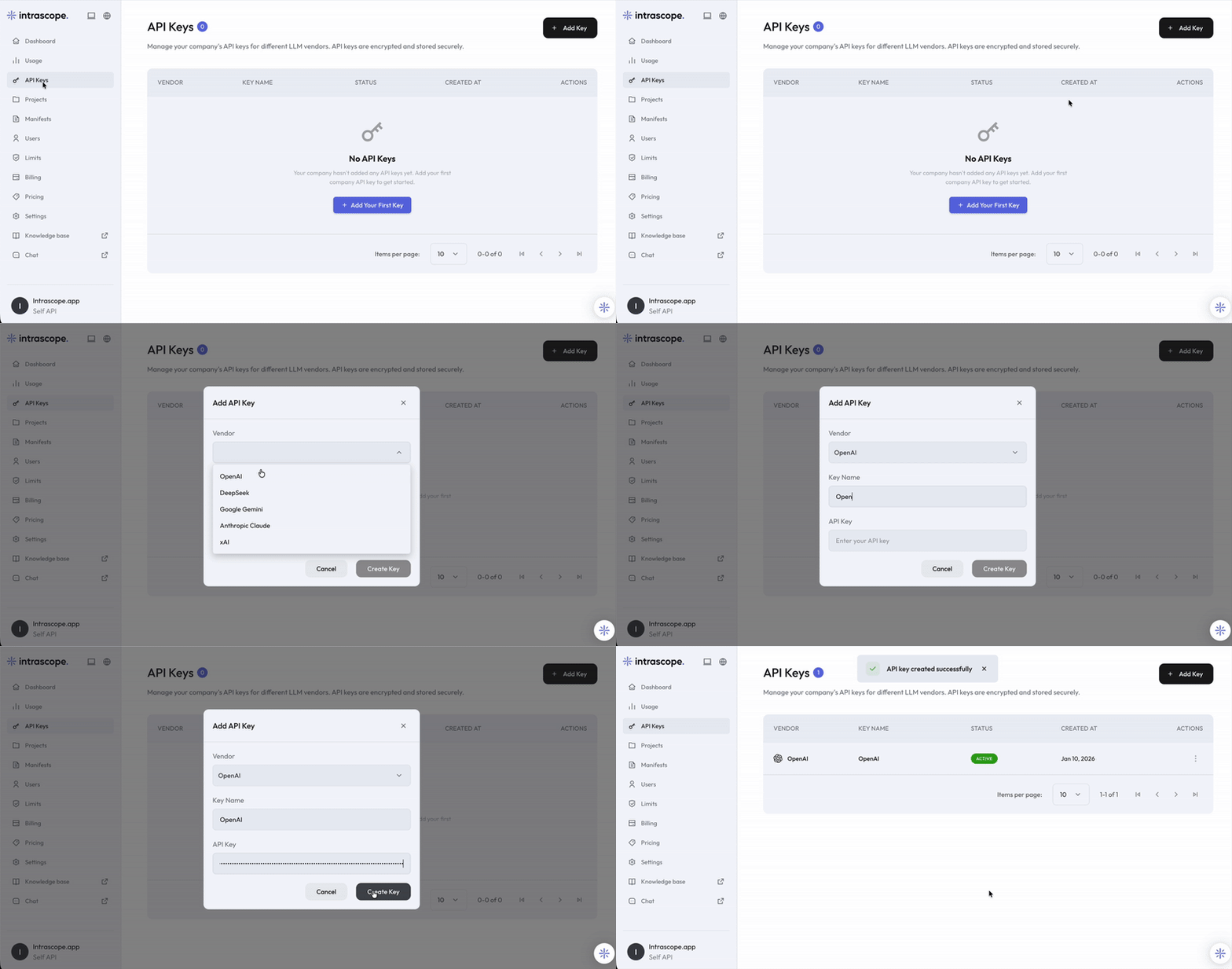
To start using AI, Intrascope AI infrastructure needs access to your models.
Go to
API Keys and add your keys from supported providers.
All keys are encrypted and visible only once.
Create keys for GPT models and embeddings.
Affordable models for daily usage and high volume tasks.
Multimodal models and fast responses.
Strong reasoning and long context models.
Real time knowledge and coversational reasoning.
Security note
Never share your API keys publicly. If a key is compromised, rotate it immediately.
See more on our security page here.
If you’re not sure how to create an API key, step by step guides are available in the
Knowledge base.
AI works best when it’s shared.
3. Create your first project
Projects keep work organized and context clean.
Create a project for a client, internal team, or use case.
Assign users and keep chats, Manifests, and decisions separated.
Manifests are your team’s shared AI brain.
Use them to define background, tone of voice, rules, structures, and best practices.
You can create a company wide Manifest or project specific ones.
This step is optional, but it’s where the real magic happens.
Choose which models are available, block expensive ones if needed, and set usage limits.
Use cheaper models for daily work and premium models only when it really matters.
Once this is done, your team can start working in
Choose a project, pick an allowed model, use Manifests as shared context, and turn important chats into summaries that live on for the whole team.
AI, but organized.
If you run into any issues, you’re not alone.
You can ask our built in AI assistant for guidance at any time.
You can also reach out to us directly in our
Discord community.
You’ll also find detailed guides and best practices in the
Knowledge base.