AI governance for teams matters because most companies did not plan their AI setup. It just happened. One person bought ChatGPT. Another started using Claude. Someone else pasted client data into a personal account. A few prompts got saved in Notion. Work moved faster, but control disappeared. This article explains where that setup breaks, why per-user AI tools make governance harder, and how teams can create a more structured system with shared access, model controls, and usage visibility.
The setup most teams have today
Take a 10-person team.
Six people have their own ChatGPT Plus accounts. Four people either share access, use free tools, or copy prompts from teammates. The team spends around $140 per month, or $1,680 per year, before anyone has answered a basic question like:
- Which models are we using?
- Who has access to what?
- Where is project context stored?
- Are people using personal accounts for company work?
- Which team or client is driving usage?
- Are we overpaying for simple tasks?
This is a common AI setup because it is easy to start.
It is also hard to manage.
The problem is not only cost. It is governance.
When AI work happens across personal accounts, shared passwords, browser tabs, and copied prompts, teams lose visibility. Context gets mixed. Sensitive data ends up in places admins cannot review. Outputs become inconsistent because everyone writes their own system prompt from scratch.
The team is using AI, but no one is really managing it.
Why governance breaks in personal accounts and seat-based tools
Most AI tools were adopted as individual subscriptions.
That works for one person. It works less well for a team.
A per-user subscription model creates two problems at once:
- It gives every user their own isolated AI environment
- It charges by seat even though AI usage is not evenly distributed
That first issue is what causes governance problems.
Each person builds their own prompts, keeps their own chat history, chooses their own model, and decides what data to include. There is no shared context, no central policy enforcement, and no reliable audit trail for day-to-day work.
That second issue creates waste.
LLM usage is based on tokens, task type, and model choice, not just headcount. One person may use AI all day. Another may use it twice a week. One task may need a premium reasoning model. Another only needs a low-cost model for summaries or formatting. But with individual subscriptions, everyone pays the same fixed price.
So teams end up with the worst mix:
- limited governance
- poor cost visibility
- duplicated context
- inconsistent outputs
- no model policy
- no central admin control
What AI governance for teams actually means
A lot of teams hear “governance” and think of approvals, policies, and slow review processes.
In practice, good governance is simpler than that.
AI governance for teams means putting structure around work that is already happening. It answers a few operational questions:
- Which models are approved for which tasks?
- Which users can access which models?
- Can teams keep project and client work separated?
- Is sensitive information staying inside a managed environment?
- Can admins see usage by person, team, or project?
- Can the business set limits, permissions, and rules without blocking useful work?
That is not bureaucracy.
That is basic operational control.
For most companies, AI is no longer a side experiment. It is part of marketing, support, research, analysis, operations, and internal documentation. Once multiple people rely on it, governance becomes a team workflow issue, not just an IT issue.
Where teams lose control: models, context, and visibility
The biggest governance gap is usually not the prompt itself.
It is everything around the prompt.
1. No model selection policy
Without guidance, people default to whatever model they know.
That is inefficient. Not every task needs the most expensive model.
- Summaries can use cheaper models
- First drafts can use mid-tier models
- Complex reasoning can use premium models
- Sensitive workflows may need specific approved models only
This matters for both governance and cost. If the company cannot control model access, it cannot create reliable quality, risk, or budget rules.
You can see how this changes quickly by comparing vendor pricing across models, such as OpenAI API pricing and Calude pricing. Model choice has a direct effect on spend and policy.
2. No shared context
When teams do not have shared context, they repeat the same background in every chat.
That means product details, campaign rules, tone of voice, client requirements, legal limits, previous decisions, and project goals get pasted over and over again. Prompts become longer. Token usage increases. Outputs vary because each user explains the context differently.
This is also a governance problem.
If important instructions only live in personal chat histories, the company cannot rely on them.
3. No usage visibility
Most teams cannot answer simple questions like:
- Which team uses AI the most?
- Which projects are driving cost?
- Who is using premium models for low-value tasks?
- Where should access be limited?
- Which workflows should be standardized?
Without usage analytics, governance becomes guesswork.
AI governance for teams needs shared context, not just restrictions
A practical approach to AI governance for teams is not only about blocking risky behavior. It is also about reducing the need for users to improvise.
This is where shared context matters.
With Intrascope, teams can use Manifests to store reusable project information in one managed workspace. That can include:
- project goals
- company rules
- tone of voice
- product information
- campaign context
- previous decisions
- client requirements
That helps in three ways.
First, it improves consistency. People work from the same baseline.
Second, it reduces prompt repetition. Users do not need to paste the same context every time.
Third, it lowers token waste. Shorter prompts and better model selection usually lead to lower spend.
Governance becomes easier when the important instructions live in the system, not in scattered personal chats.
A simple comparison: individual subscriptions vs a shared workspace
Here is what the difference looks like in practice.
| Setup | Individual subscriptions | Shared AI workspace with Intrascope |
|---|---|---|
| Cost model | 7 paid accounts at $20 = $140/month | Shared API usage across one workspace |
| Model choice | Limited, user by user | Admin-managed model selection |
| Context | Personal chat history | Shared project context and Manifests |
| Visibility | No team-level analytics | Usage analytics by user, project, and model |
| Access control | Personal accounts or shared passwords | Centralized users, permissions, and limits |
| Governance | Hard to enforce | Practical team control in one place |
For many teams, API-based usage can reduce AI costs by 70 to 85 percent, depending on workload, model mix, and usage habits.
That is not only a finance improvement.
It also makes governance easier because the team is working inside one system instead of across disconnected accounts.
This is where Intrascope helps
In many companies, AI governance starts as a policy document.
The real issue is infrastructure.
If the team has no shared place to work, no model controls, no analytics, and no managed context, the policy will not hold up for long.
This is where Intrascope helps.
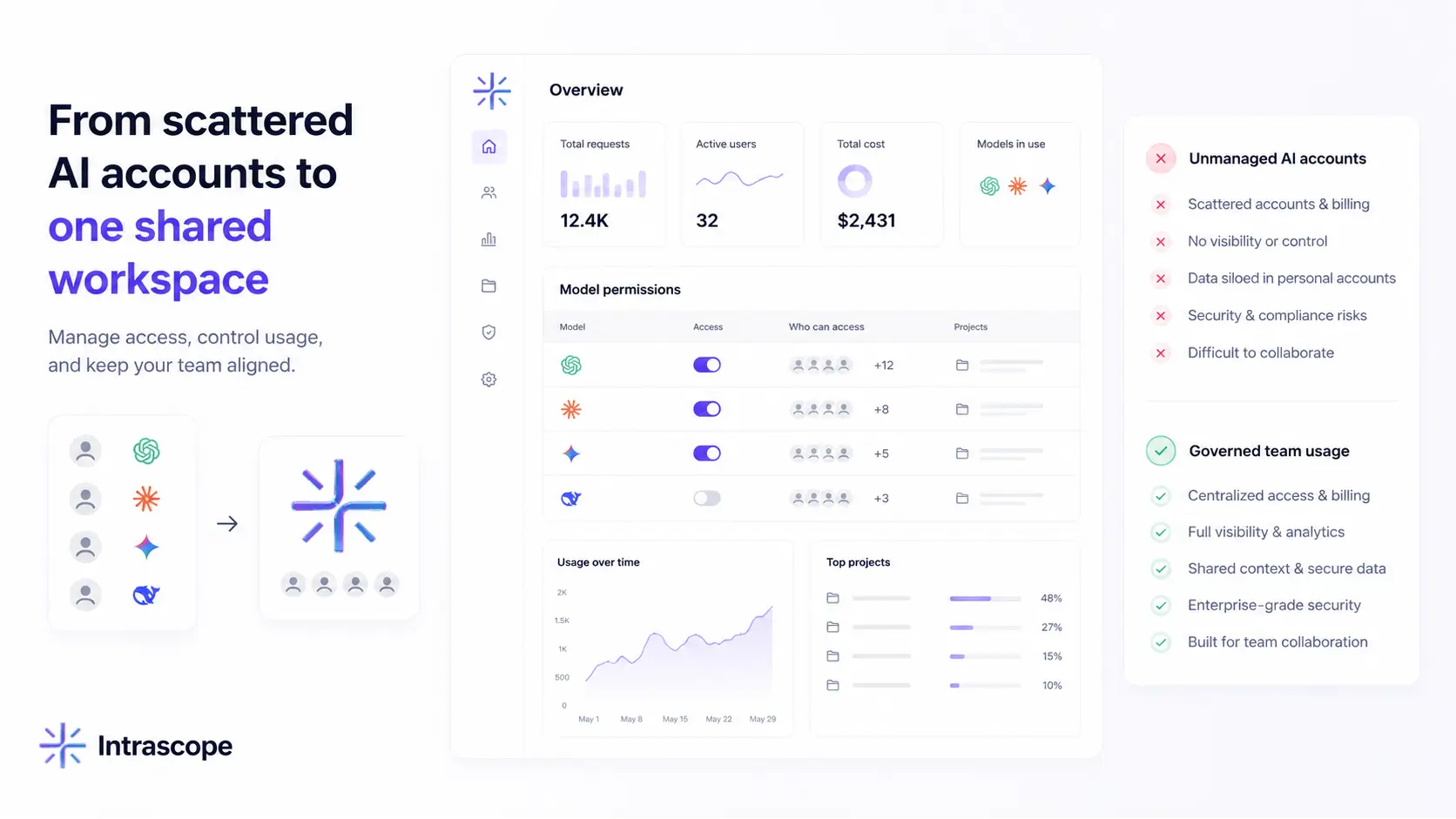
Intrascope gives teams a shared AI workspace where they can:
- connect supported models in one place
- choose the right model for each task
- control which users can access which models
- track usage across people, projects, and teams
- keep project context in Manifests
- separate client or department work
- avoid shared passwords and personal AI accounts
- set admin permissions and model limits
That makes governance more practical.
Instead of asking every employee to manage risk alone, the company provides a better default environment.
People can still move quickly.
They just do it inside a setup the business can actually manage.
Governance should improve productivity, not fight it
The mistake many teams make is treating governance and productivity as opposites.
They are not.
Bad governance slows teams down because everyone rebuilds context, repeats prompts, switches tools, and works without clear rules. Good governance reduces that friction. It gives people approved models, shared context, project separation, and clear visibility.
That is why AI governance for teams should be treated as an operating system for daily AI work, not a late-stage compliance task.
If your team is already using AI across multiple people and projects, the next step is not another set of personal subscriptions. It is a more structured setup with shared context, model control, usage analytics, and admin visibility.
With Intrascope, teams can centralize AI usage, reduce costs, and keep control in one shared workspace.