Cost management
Control AI Spending Without Limiting Adoption
See where AI budget is being used, reduce unnecessary subscriptions and match each task with the right model and cost.
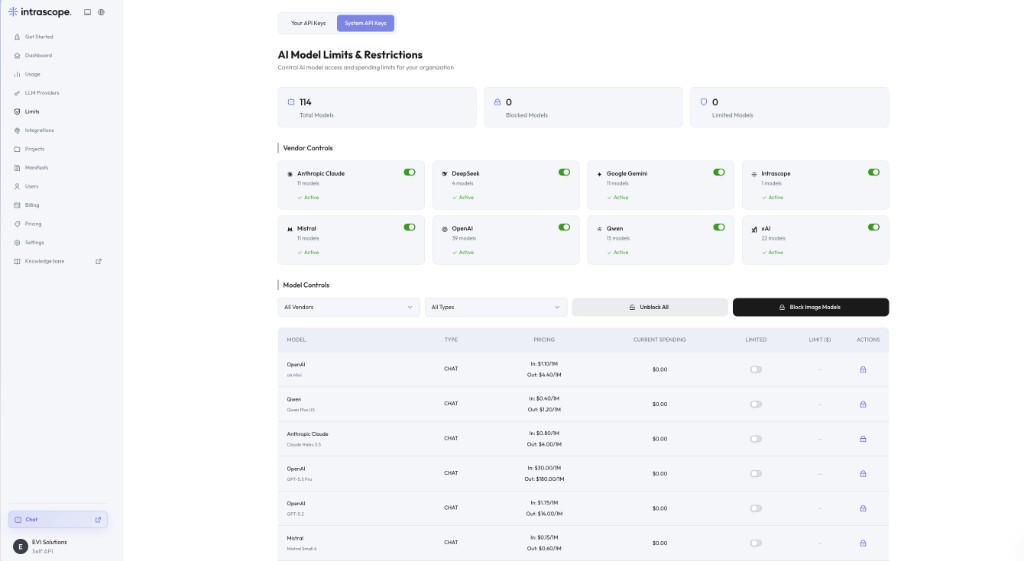
- Spending caps per model, set by admins
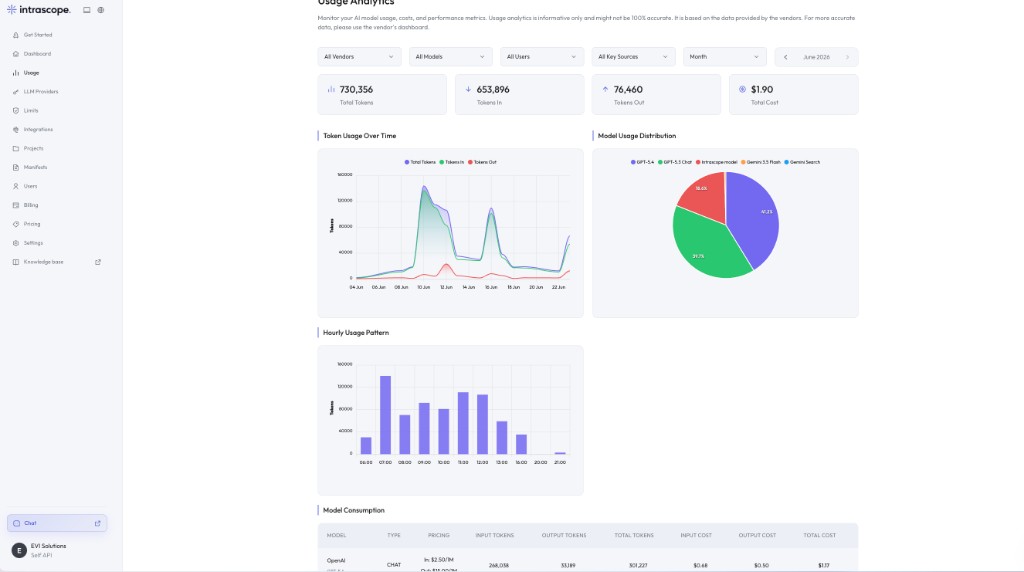
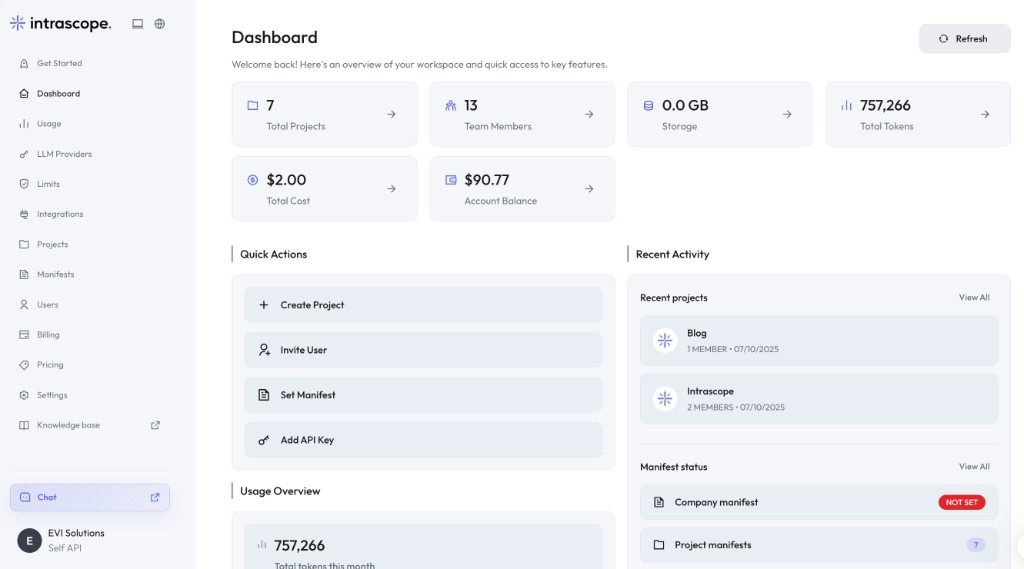
- Cost by user, model and project in one dashboard
- Workspace plans from $49/month plus usage
The problem
Per-seat pricing charges for people, not for work
The typical company AI bill is a stack of individual subscriptions bought at different times by different departments. It grows with headcount and never shrinks with usage.
Light users cost the same as heavy users
A finance lead who rewrites a paragraph twice a month pays the same monthly seat price as a strategist living in the tool all day.
Nobody knows what the total is
Subscriptions land on personal cards, team cards and reimbursement forms. Nobody can produce a single number for company AI spend.
Premium models do routine work
Without controls, the most expensive model handles meeting notes and translations because it is the one already selected.
Cancelling is guesswork
With no usage data, removing a seat feels risky, so unused subscriptions renew quietly for another year.
The solution
Pay for a workspace and the usage inside it
Intrascope separates the cost of access from the cost of usage. Everyone gets into the workspace; what they consume is measured, capped and attributable.
Usage-based access
One workspace plan covers your team, and model usage is billed on what is actually consumed rather than on how many people have a login.
Spending caps per model
Set a limit on individual models so premium reasoning stays available for real work without being able to run away with the budget.
Spending by user
See which people drive the most consumption and which accounts are idle, before renewal season instead of after it.
Spending by model
The model distribution chart shows exactly where tokens go, making an expensive default obvious at a glance.
Spending by project
Projects group work by client, campaign or department, so cost can be traced to the work that produced it.
BYOK or managed usage
Keep provider billing direct with your own API keys, or top up a single workspace balance and skip vendor accounts entirely.
Put a number on your current AI spend
Use the free audit if you are not ready for a demo, or bring invoices to a short call and we will walk through the same usage inside one workspace.
How it works
Four steps to a predictable AI bill
Start by measuring what you already spend, then decide what the workspace is allowed to consume.
- 01
Centralize access
Move the team into one workspace so AI spend stops arriving through personal cards and scattered invoices.
- 02
Set model limits
Enable the models you want available and attach spending caps to the expensive ones.
- 03
Watch the first month
Usage analytics show tokens and cost by user, model and project, which is usually the first honest picture of company AI use.
- 04
Adjust the mix
Move routine work onto light models, keep premium models for the tasks that justify them and cancel the subscriptions nobody opens.
Inside the product
Where cost control lives in the workspace
Limits decide what can be spent. Usage analytics show what was spent. The dashboard keeps the running total in view.
Cost example
A 20-person team, before and after centralizing
This is an illustration of the arithmetic, not a promise about your bill. Your usage cost depends on the models your team chooses and how much they work.
Typical setup
Individual subscriptions
$280/month in fixed seats
- 14 people on a $20/month plan, bought at different times
- 6 people with no access, asking colleagues to run prompts for them
- Cost is identical whether someone sends 5 prompts or 500
- Separate invoices per provider, no shared view
- Unused seats renew because nobody can prove they are unused
With Intrascope
Intrascope workspace plus usage
$99/month for up to 25 users, plus what you consume
- The Business plan covers up to 25 users plus an admin
- Model usage is billed on consumption, so light users cost almost nothing
- Spending caps stop a single model from dominating the bill
- One dashboard shows cost by user, model and project
- Annual billing is priced at ten months instead of twelve
Companies can reduce unnecessary AI software costs by replacing unused individual subscriptions with centrally managed access. How much depends entirely on your team's real usage. Two published examples: our first enterprise pilot, a 50-person consulting firm, used $13 of model usage in month one, and an 8-person marketing agency ran a month of campaign work on $27.
Run the same arithmetic on your team
Tell us your headcount and current subscriptions, and we will map them against a workspace plan and realistic usage.
Business outcome
What finance gets out of this
One number for AI spend
Workspace plan plus usage, in one place, instead of an estimate assembled from expense reports.
Cost tied to work
Spending can be attributed to a project, a client or a department rather than to a person's credit card.
No cost of idle seats
Occasional users stop carrying the price of a full subscription they open twice a month.
Predictable ceilings
Per-model caps mean the worst case is a number you chose, not a surprise at the end of the month.
Evidence for budget planning
A few months of usage data turns next year's AI budget into a forecast instead of a guess.
Adoption without a spending freeze
Because access is not the expensive part, you can give more people AI while spending less overall.
Before and after
Two ways to pay for company AI
The question is not whether AI is worth paying for. It is whether you are paying for access or for outcomes.
| Topic | Per-seat subscriptions | Intrascope workspace |
|---|---|---|
| What you pay for | A seat per person, whether or not it is used. | A workspace plan plus the usage your team actually consumes. |
| Light users | Full price, every month. | Included in the workspace, with usage cost close to zero. |
| Cost visibility | Invoices per provider, no breakdown by person or task. | Cost by user, model, project and vendor in one dashboard. |
| Controlling the ceiling | Cancel a seat, or nothing. | Per-model spending caps and blocked models. |
| Adding people | Another recurring charge before the first prompt. | An invite inside the plan's user allowance. |
| Expensive model use | Invisible until output quality or the bill changes. | Visible in the model distribution chart from day one. |
What you pay for
Per-seat subscriptions
A seat per person, whether or not it is used.
Intrascope workspace
A workspace plan plus the usage your team actually consumes.
Light users
Per-seat subscriptions
Full price, every month.
Intrascope workspace
Included in the workspace, with usage cost close to zero.
Cost visibility
Per-seat subscriptions
Invoices per provider, no breakdown by person or task.
Intrascope workspace
Cost by user, model, project and vendor in one dashboard.
Controlling the ceiling
Per-seat subscriptions
Cancel a seat, or nothing.
Intrascope workspace
Per-model spending caps and blocked models.
Adding people
Per-seat subscriptions
Another recurring charge before the first prompt.
Intrascope workspace
An invite inside the plan's user allowance.
Expensive model use
Per-seat subscriptions
Invisible until output quality or the bill changes.
Intrascope workspace
Visible in the model distribution chart from day one.
How teams use it
Where cost control pays off first
These are the situations where per-seat pricing hurts most and centralized usage helps immediately.
Mixed teams of power users and occasional users
Two or three people generate most of the consumption while the rest need AI a few times a week. Usage-based access prices that reality correctly.
Agencies tracking cost by client
A project per client turns AI usage into a number you can review against the retainer, or pass through with confidence.
Premium models only where they matter
Caps and model controls keep advanced reasoning available for analysis while routine drafting runs on cheaper models.
Consolidating personal subscriptions
Replace a spread of individual plans with one workspace, then use the first month of data to decide what genuinely needs to come back.
Planning next year's budget
Export the trend from usage analytics and build the forecast on measured consumption instead of headcount multiplied by a seat price.
FAQ
Questions teams ask before they switch
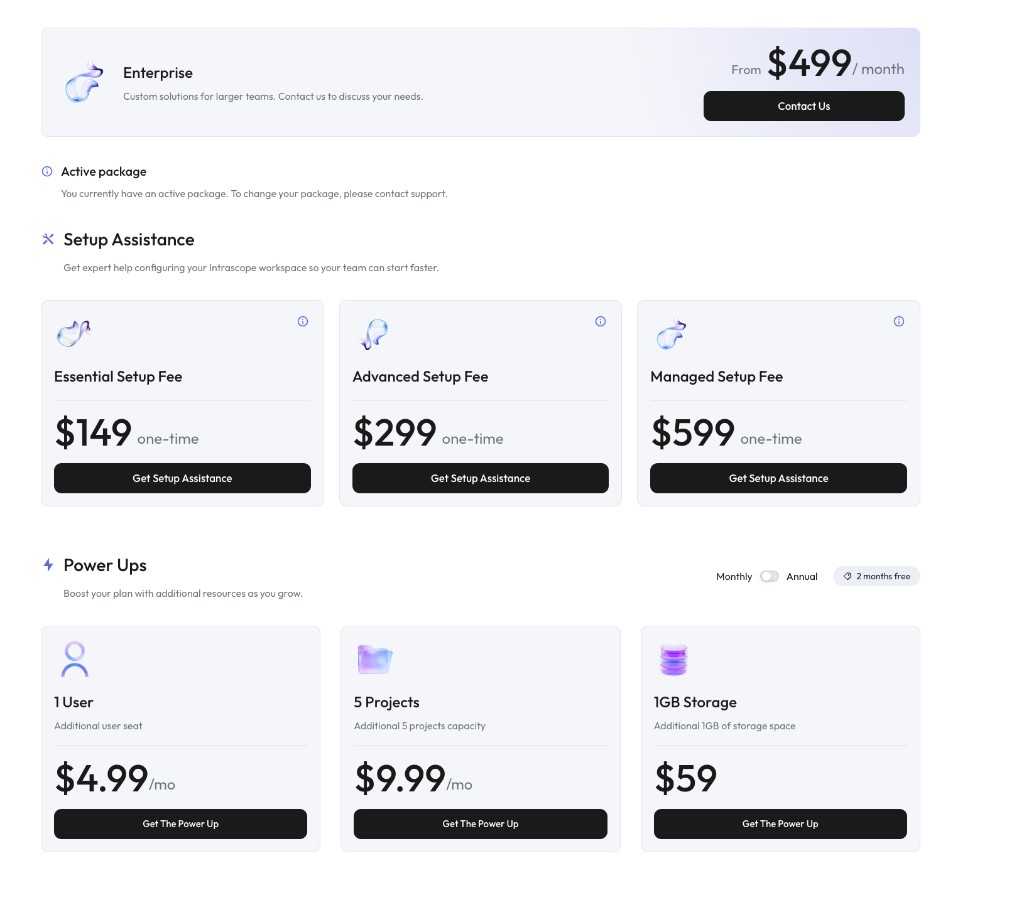
There is a workspace subscription and, separately, the cost of model usage. Starter is $49/month for 10 users plus an admin, Business is $99/month for 25 users plus an admin, and Growth is $299/month for 40 users plus an admin. Annual billing is charged for ten months instead of twelve.
If you connect your own API keys, the provider bills you directly and Intrascope shows you the consumption. If you use managed usage, you top up a workspace balance and usage is drawn from it.
Admins can set a spending limit per model in the Limits screen, and block models or entire vendors outright. Managed usage is also bounded by the balance you have topped up.
That depends on your team's usage. Replacing unused individual subscriptions with centrally managed access removes fixed cost that produced no work, but heavy usage of premium models still costs money. The point of the analytics is to make that trade-off visible.
Yes. Usage analytics break tokens and cost down by user, and can be filtered by vendor, model, key source and time period.
With managed usage, consumption stops when the workspace balance runs out until you top up again. With your own API keys, provider billing continues, which is why per-model caps and the usage dashboard matter.
No. They are users inside the workspace plan, and their usage cost reflects the small amount of work they actually run.
Explore the rest of the platform
Learn more
Ready to bring company AI usage under control?
Replace unused subscriptions with measured usage, set the ceiling yourself and give more people AI for less than you spend today.
7-day free trial · No credit card required