Shared context
Stop Rebuilding the Same Context in Every AI Chat
Turn company knowledge, project requirements and client instructions into reusable context available to the right employees.
- Company, project and personal context layers
- Applied from the chat, across supported models
- Knowledge stays in the workspace when people leave
The problem
Every chat starts from nothing
The most repeated task in company AI use is explaining the company. Who we are, who we serve, how we write, what we never say. Most teams retype it several times a day.
The same briefing, endlessly
Each person opens a new chat and pastes their own version of the company background, so the model gets a slightly different company every time.
Output drifts between people
Two colleagues writing for the same client produce material in two different voices, because their prompts were never the same.
Good prompts stay private
Somebody works out an instruction set that produces genuinely good output, and it lives in their chat history where nobody else can find it.
Context leaves with the employee
When someone moves on, the accumulated knowledge of how to brief AI on their clients goes with them.
The solution
Write the context once, reuse it everywhere
In Intrascope, reusable context layers are called Manifests. They can contain company instructions, project details, client requirements or personal working preferences.
Company context
What the company does, how it speaks and the rules that apply to everything, maintained centrally and applied by default.
Project and client context
Each project carries its own manifest, so client requirements and campaign specifics come with the work.
Tone and response rules
Define voice, formatting expectations and the things AI should never do, instead of hoping each person remembers to ask.
Consistent output across models
The same manifest can be applied whichever supported model a person chooses, so switching model does not change the voice.
Faster onboarding
A new colleague inherits the same context as everyone else on their first day, rather than learning it prompt by prompt.
Knowledge stays with the company
Context lives in the workspace, not in a personal account, so it survives holidays, handovers and resignations.
Start from a ready-made manifest
Copy a polished template, edit the placeholders, then apply it in Intrascope. Prefer a walkthrough? Bring a brand guideline to a short demo.
How it works
Building a context layer your team will actually use
Start with the paragraph your team retypes most often. That is almost always the company manifest.
- 01
Write the company manifest
Capture what the company does, who it serves, the voice it uses and the rules that always apply.
- 02
Add project manifests
For each client, campaign or department, record the specifics that only apply there.
- 03
Give people access
Project membership decides who works with which context, so client material stays with the account team.
- 04
Apply it from the chat
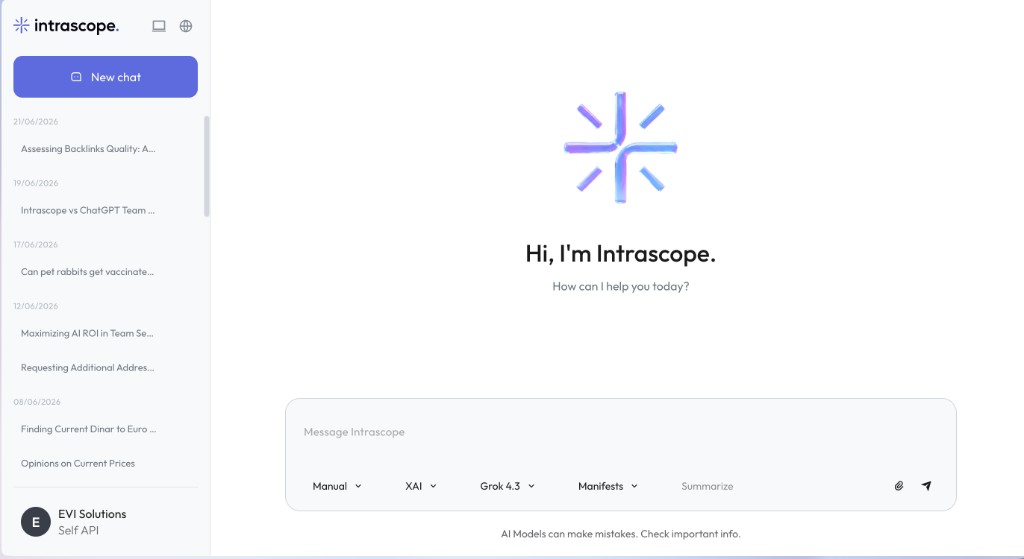
Team members select the manifest in the composer and start with the brief already in place.
Inside the product
Where shared context lives
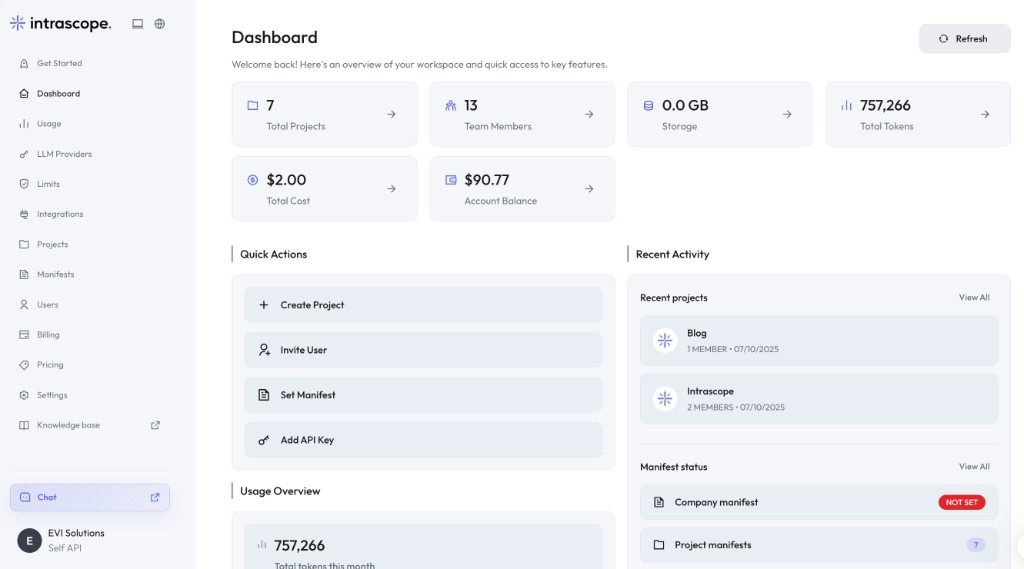
Manifests are edited in their own screen, tracked on the dashboard and applied from the chat composer.
Business outcome
What reusable context is worth
Less repeated prompt setup
The briefing paragraph is written once instead of being retyped by every person in every conversation.
More consistent output
Material produced by different people for the same client starts from the same instructions.
Faster onboarding
New colleagues produce usable work sooner because the context they need is already in the workspace.
Fewer tokens spent on preamble
Shorter, sharper prompts and fewer corrective rounds mean less consumption for the same result.
Knowledge retention
What the company learns about briefing AI accumulates in the workspace rather than in private histories.
Cleaner handovers
When work moves between colleagues, the context moves with the project instead of being reconstructed.
Before and after
Prompting from scratch, or starting from shared context
The work is identical. What differs is how much of it happens before anyone gets a useful answer.
| Topic | Context in personal chats | Context in manifests |
|---|---|---|
| Starting a task | Paste your own version of the background first. | Select the manifest and begin with the actual request. |
| Consistency | Depends on who wrote the prompt that day. | The same instructions apply for everyone on the project. |
| Client specifics | Remembered, or forgotten, by individuals. | Attached to the project the work happens in. |
| Switching models | Re-explain everything in the new tool. | Apply the same manifest to another supported model. |
| Onboarding | Learn the unwritten prompt conventions over months. | Inherit the company and project context on day one. |
| When someone leaves | Their prompt knowledge leaves with the account. | It stays in the workspace with the project. |
Starting a task
Context in personal chats
Paste your own version of the background first.
Context in manifests
Select the manifest and begin with the actual request.
Consistency
Context in personal chats
Depends on who wrote the prompt that day.
Context in manifests
The same instructions apply for everyone on the project.
Client specifics
Context in personal chats
Remembered, or forgotten, by individuals.
Context in manifests
Attached to the project the work happens in.
Switching models
Context in personal chats
Re-explain everything in the new tool.
Context in manifests
Apply the same manifest to another supported model.
Onboarding
Context in personal chats
Learn the unwritten prompt conventions over months.
Context in manifests
Inherit the company and project context on day one.
When someone leaves
Context in personal chats
Their prompt knowledge leaves with the account.
Context in manifests
It stays in the workspace with the project.
How teams use it
What goes into a manifest
The best manifests are the documents your team already argues about, written down where AI can read them.
Brand guidelines
Voice, vocabulary, formatting conventions and the phrases the company does not use, applied to every piece of copy.
Client campaign context
Audience, objectives, offer and constraints for a specific campaign, available to the whole account team.
Internal writing standards
How internal documents, updates and summaries should be structured so they are readable across departments.
Product documentation
What the product does and what it does not, so answers stop drifting into features that do not exist.
Support procedures
Tone, escalation rules and the standard shape of a response, shared by everyone answering customers.
Research and proposal templates
The structure a research summary or client proposal should follow, so output arrives in a familiar format.
FAQ
Questions teams ask before they switch
A manifest is a reusable context layer. It can hold company instructions, project details, client requirements, tone rules or personal working preferences, and it is applied to a conversation from the chat composer.
A saved prompt is one person's text. A manifest belongs to the workspace or a project, applies to everyone who works there and stays current because it is maintained in one place.
Yes. Manifests can be attached at project level, so each client or campaign carries its own instructions and only the people on that project work with them.
Yes. The manifest is applied when the message is sent, so it works with the supported model your team selects rather than being tied to one vendor.
The company manifest is maintained centrally by admins, while project manifests belong to the projects they serve, which keeps client instructions with the account team.
No. Intrascope does not use your chats, prompts, manifests or workspace data to train AI models.
Most teams start with a single page: what the company does, who it serves, how it writes and what to avoid. That first version already removes the majority of repeated typing.
Explore the rest of the platform
Learn more
Ready to bring company AI usage under control?
Write your company and client context once, apply it across models and keep it in the workspace where the whole team can use it.
7-day free trial · No credit card required