Multi-model workspace
One AI Workspace for Every Model Your Team Needs
Give employees controlled access to leading AI models through one shared workspace, without forcing the entire company to depend on a single provider.
- OpenAI, Claude, Gemini, xAI, Mistral, DeepSeek and Qwen
- Admins decide which models the workspace can reach
- 7-day free trial, no credit card required
The problem
Model choice today is whatever each employee happened to buy
Without a company workspace, model access becomes a personal purchasing decision. People use the tool they already pay for, not the one that fits the task.
One provider per person
A designer is on ChatGPT Plus, a strategist is on Claude Pro and an analyst uses a free Gemini account. Nobody can compare outputs and nobody can switch when a provider has a bad week.
Separate logins, separate invoices
Every provider means another account, another renewal date and another line item. Finance sees charges, not what the company got for them.
No admin control over models
There is no way to define which models the company is comfortable using, or to keep expensive reasoning models out of routine drafting work.
Work does not move between models
Instructions and project background live inside one vendor's chat history, so trying a different model means rebuilding the brief from scratch.
The solution
One workspace, every approved provider, admin controls included
Intrascope connects the providers your company approves and puts them behind a single interface with projects, reusable context and usage tracking.
Access every major provider
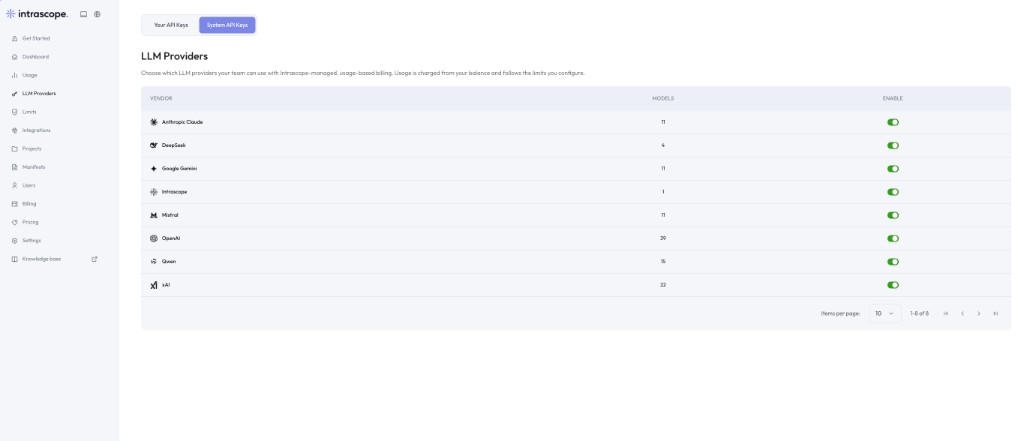
OpenAI, Anthropic Claude, Google Gemini, xAI, Mistral, DeepSeek and Qwen are available from the same chat, alongside the Intrascope managed model.
Admins choose what is enabled
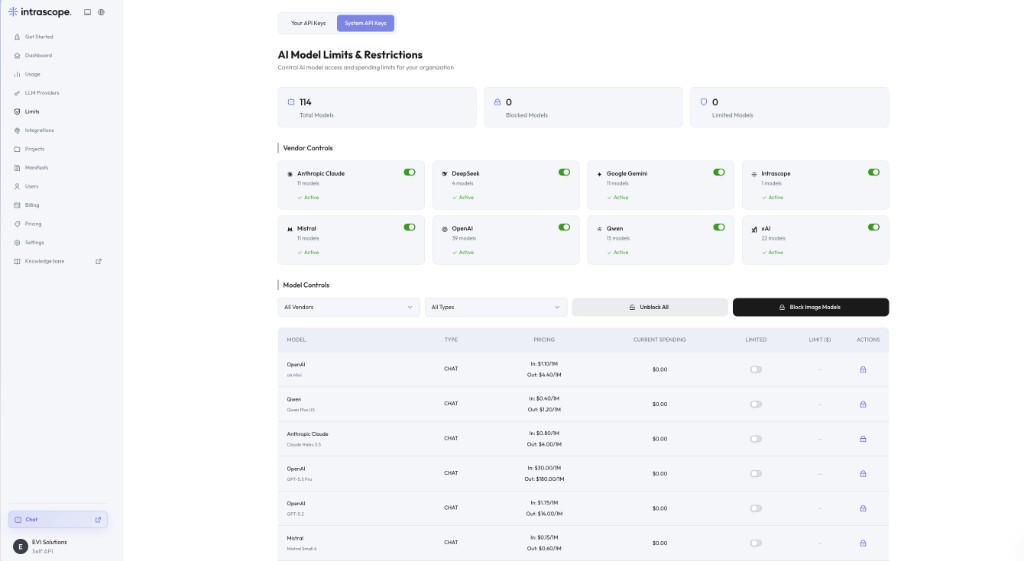
Turn entire vendors or individual models on and off for the workspace, so the model list your team sees is the list you approved.
Match the model to the task
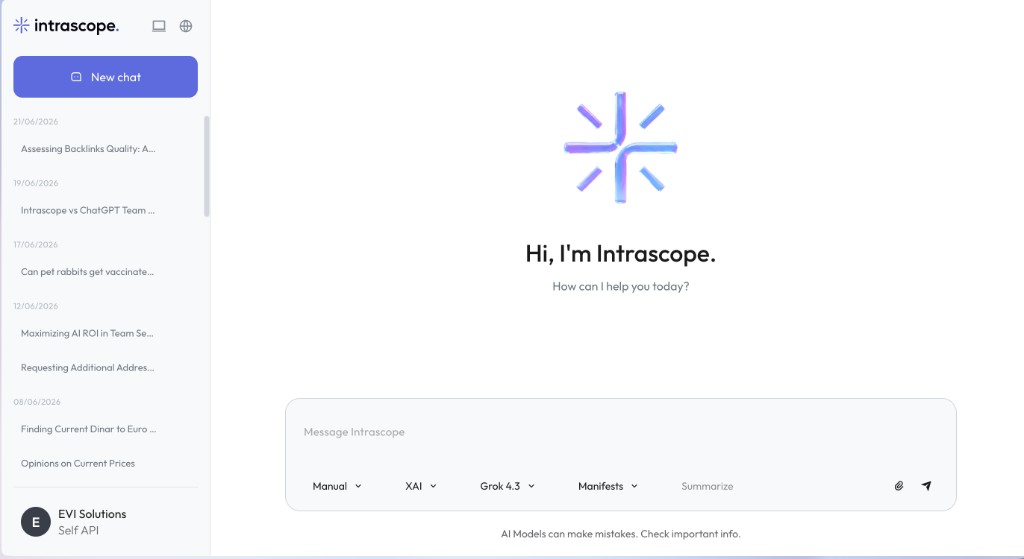
Switch models inside a conversation. Use a light model for a summary and a reasoning model for the analysis that follows.
Context that follows the model
Manifests carry tone, company knowledge and response rules across providers, so changing model does not mean rewriting the brief.
Projects instead of private chats
Group conversations, users and context by client, department or initiative rather than by whoever started the thread.
Usage visible per model
See tokens and cost by vendor and model, so model choice becomes a decision you can review instead of a habit.
See the model selector with your own providers
A short walkthrough covers provider setup, model controls and how your team would switch models day to day.
How it works
From scattered accounts to one model workspace
Most teams get through this in an afternoon, starting with one project and one company manifest.
- 01
Connect your providers
Add your company API keys, or start with Intrascope-managed usage and skip provider onboarding entirely.
- 02
Enable the models you approve
In Limits, switch vendors and individual models on or off for the workspace and set spending caps where they matter.
- 03
Invite your team into projects
Create projects per client, department or initiative, then give each person access to the ones they work on.
- 04
Work and review from one place
Your team chats and switches models while admins watch tokens, cost and model mix from the usage dashboard.
Inside the product
What multi-model access actually looks like
Three screens do most of the work: the provider list, the model controls and the chat your team uses every day.
Marketing Q2
Client - Acme Corp
Product Research
Support Playbooks
Business outcome
What changes once model access is centralized
Less dependence on one provider
If a provider raises prices, degrades quality or goes down, your team changes model instead of migrating the company.
Right model for the right task
Routine drafting runs on light models while premium reasoning is reserved for work that genuinely needs it.
Fewer subscriptions to administer
One workspace plan and one usage balance instead of individual seats spread across several vendors.
Faster onboarding
A new employee gets approved models and existing project context on day one, without a purchase request.
Output you can compare
Run the same brief through two providers with the same manifest and keep the stronger result.
A model policy you can enforce
Model rules stop being a document nobody reads and become a workspace setting.
Before and after
Model access without Intrascope, and with it
The difference is not the number of models available on the market. It is who decides which ones your company uses, and whether anyone can see the result.
| Topic | Without Intrascope | With Intrascope |
|---|---|---|
| Model choice | Limited to whatever each person subscribed to. | Every approved model available to every approved user. |
| Switching models | Copy the prompt into another tool and rebuild the context. | Change the model in the composer and keep the manifest and project. |
| Admin control | None. Access is a personal purchase decision. | Vendors and individual models enabled or blocked for the workspace. |
| Cost visibility | Separate invoices per provider with no per-task view. | Tokens and cost by model, user and project in one dashboard. |
| Company knowledge | Sits in individual chat histories. | Sits in manifests and projects the team shares. |
| Adding a provider | New subscriptions, new logins, new approvals. | Add a key or enable managed usage, then toggle the models. |
Model choice
Without Intrascope
Limited to whatever each person subscribed to.
With Intrascope
Every approved model available to every approved user.
Switching models
Without Intrascope
Copy the prompt into another tool and rebuild the context.
With Intrascope
Change the model in the composer and keep the manifest and project.
Admin control
Without Intrascope
None. Access is a personal purchase decision.
With Intrascope
Vendors and individual models enabled or blocked for the workspace.
Cost visibility
Without Intrascope
Separate invoices per provider with no per-task view.
With Intrascope
Tokens and cost by model, user and project in one dashboard.
Company knowledge
Without Intrascope
Sits in individual chat histories.
With Intrascope
Sits in manifests and projects the team shares.
Adding a provider
Without Intrascope
New subscriptions, new logins, new approvals.
With Intrascope
Add a key or enable managed usage, then toggle the models.
How teams use it
Workflows that need more than one model
These are the patterns that appear once a team stops thinking in subscriptions and starts thinking in tasks.
Routine work on light models
Meeting notes, translations and internal summaries run on small models where the quality is fine and the cost is a fraction of a premium call.
Reasoning models for the hard part
A consultant drafts a structure on a light model, then sends the argument to a reasoning model for pressure testing.
Side-by-side comparison
A marketing lead runs one campaign brief through two providers with the same manifest applied, and keeps the stronger version.
Different work, different tiers
Long-context models handle documentation reviews while fast, cheap models handle everyday chat, and the usage dashboard shows what each choice costs.
Continuity during provider issues
When one vendor is degraded, the team selects another enabled model and the day continues.
FAQ
Questions teams ask before they switch
OpenAI, Anthropic Claude, Google Gemini, xAI, Mistral, DeepSeek and Qwen are supported, along with the Intrascope managed model. Each vendor exposes its own set of models, and admins choose which of them are enabled for the workspace.
Yes. In Limits, admins can enable or block entire vendors and individual models, and set a spending cap per model. Blocked models never appear in the chat model selector.
No. You can connect your own API keys for the providers you already use and rely on Intrascope-managed usage for the rest. Both options can run in the same workspace.
No. Manifests and project context are applied when the message is sent, so the same company, project and client background follows you when you change model.
Model availability is configured for the workspace, and project membership controls who works where. Together they keep sensitive or expensive work with the people who should be doing it.
ChatGPT Team gives your company seats with a single provider. Intrascope is a workspace across providers, with projects, reusable context, model-level controls and usage analytics on top of the chat itself.
No. Intrascope does not use your chats, prompts, manifests or workspace data to train AI models.
Creating a workspace, connecting a provider and inviting your first users takes minutes. Most teams begin with one project and one company manifest, then expand from there.
Explore the rest of the platform
Learn more
Ready to bring company AI usage under control?
Bring every approved model into one workspace, with the projects, shared context and spending controls your team needs to use them well.
7-day free trial · No credit card required