For consulting firms
One AI Workspace for Every Client and Consulting Project
Keep client context organized, give consultants access to the right AI models and retain valuable knowledge inside the firm.
- A project per client, with its own shared context
- Cost tracked by project and by consultant
- Used by our first enterprise pilot, a 50-person firm
The problem
Consulting knowledge is the asset, and it is sitting in personal chats
Advisory work runs on accumulated understanding of clients, regulations and precedent. When AI usage is personal, that understanding never reaches the firm.
Client context lives with individuals
The consultant who knows how to brief AI on a client's structure and history is the only person who can do it quickly.
Free tools, client-facing standards
Teams default to free consumer accounts, then rewrite the output by hand because the quality does not meet a professional standard.
No separation between engagements
Work for different clients happens in the same personal chat history, with nothing structural keeping them apart.
Nothing is attributable
There is no way to say what AI cost on a given engagement, which makes the question of passing it through impossible to answer.
The solution
The firm's structure, reflected in the workspace
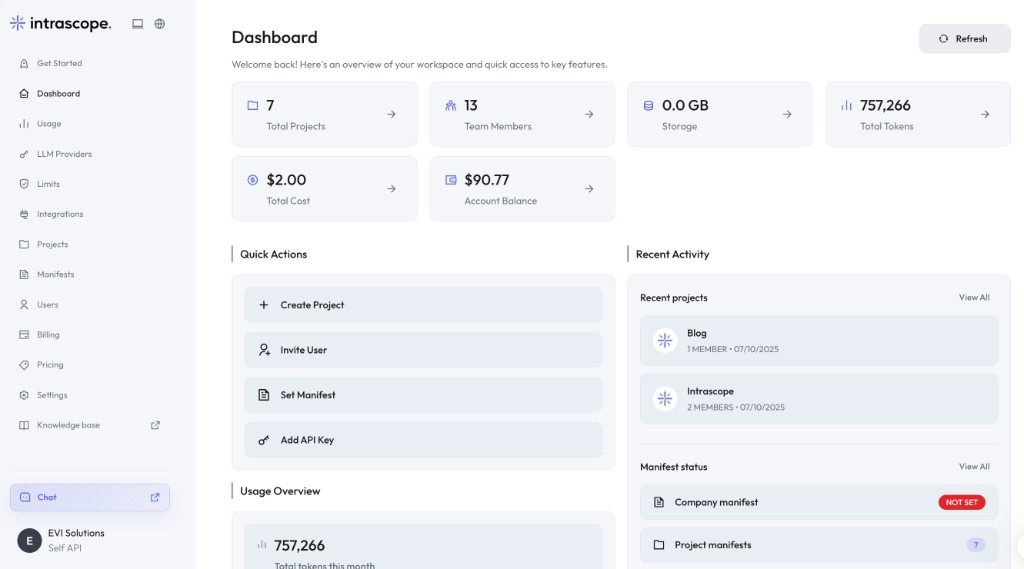
Projects mirror engagements, manifests hold client context, and usage reporting follows both. Consultants get better models; the firm keeps the knowledge.
A project per client or engagement
Conversations, users and context are grouped by the work they belong to, and access follows the account team.
Shared client context
Client background, terminology and reporting preferences live in a project manifest that every consultant on the engagement can apply.
Access to premium models
Reasoning models for interpretation and analysis, lighter models for summaries and drafts, all through approved company access.
Cost tracking by project
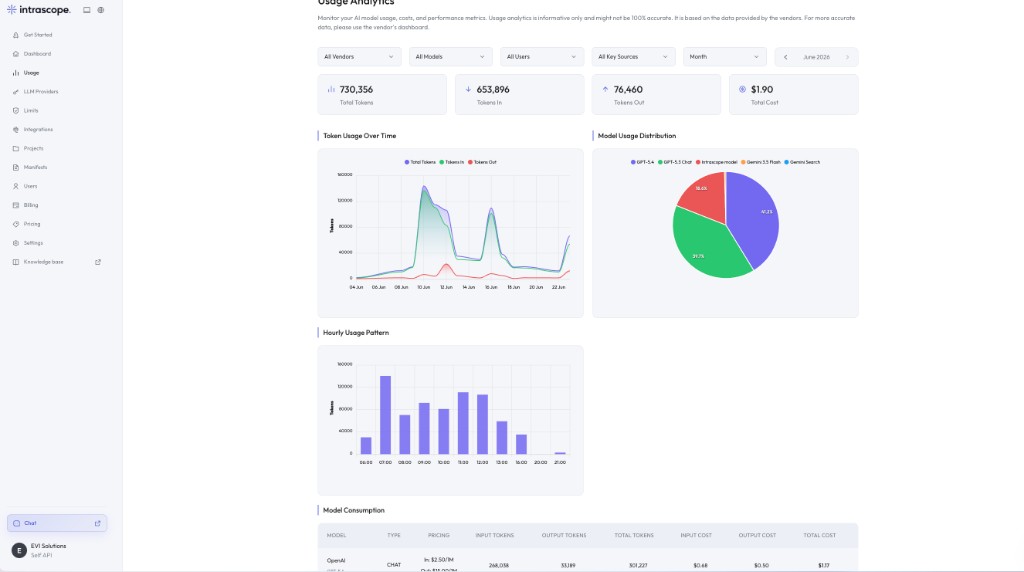
Usage analytics attribute tokens and cost to the project that produced them, so engagement economics stay visible.
Controlled employee access
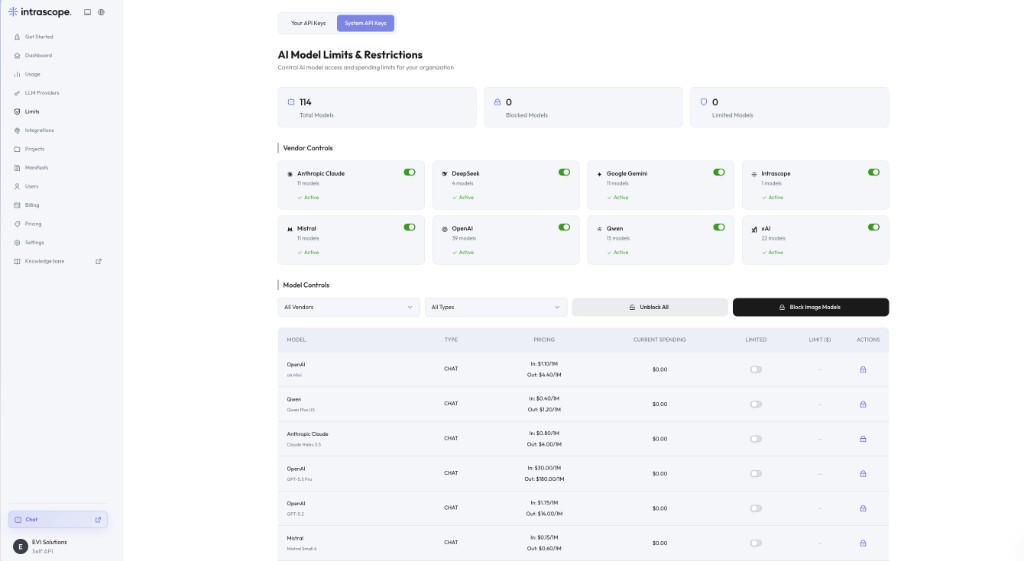
Admins decide which models are available and which consultants belong to which projects.
Knowledge retention
What the firm learns about serving a client stays in the workspace when a consultant changes team or leaves.
See the workspace mapped to your engagements
Bring one live client engagement to a short demo and we will show you how it would be structured as a project.
How it works
Setting up a firm, engagement by engagement
Most firms start with two or three active engagements and expand once the pattern is comfortable.
- 01
Structure the workspace around clients
Create a project per client or major engagement, plus internal projects for research and business development.
- 02
Write the context down
A company manifest for the firm's standards, and a project manifest per client for their specifics.
- 03
Set model access
Enable the providers and models the firm approves, and cap the expensive ones where appropriate.
- 04
Bring the consultants in
Invite people into the engagements they work on. Usage and cost start reporting from the first conversation.
Inside the product
How the workspace maps to consulting work
Projects for engagements, manifests for client context, analytics for the economics.
Marketing Q2
Client - Acme Corp
Product Research
Support Playbooks
Proof
Our first enterprise pilot was a 50-person consulting firm
A firm working across tax advisory, financial consulting, business advisory and editorial moved from mostly free ChatGPT accounts to a governed workspace with premium models. We handled onboarding, connected provider accounts, set model limits and built a department-oriented project structure. First-month model usage came to $13, and we shipped a custom RAG module over more than 1GB of internal regulations via n8n.
50
employees onboarded
$13
model usage in month one
1GB+
of regulations in a custom RAG module
Start the same way the pilot firm did
Onboarding covers provider setup, model limits and a project structure that matches how your firm is organized.
Business outcome
What the firm gets
Client knowledge stays in the firm
Engagement context is an asset on the balance sheet of the workspace, not a habit inside one consultant's account.
Consistent client-facing output
Reports and summaries for the same client start from the same instructions, whoever is writing them.
Engagement-level economics
AI cost can be reviewed per project, which makes internal allocation and client conversations straightforward.
Better answers than free tools
Premium models become available through company access rather than through personal subscriptions.
Faster ramp-up on a new engagement
A consultant joining a project inherits the client context that the team has already built.
Clear separation between clients
Project structure and membership keep engagements apart by design, not by discipline.
Before and after
A consulting firm on personal accounts, and on a workspace
Same people, same clients, same deadlines. The difference is where the knowledge and the cost end up.
| Topic | Personal AI accounts | Intrascope workspace |
|---|---|---|
| Client context | Retyped from memory by whoever is working. | A project manifest the whole account team applies. |
| Engagement separation | One personal chat history for every client. | A project per engagement, with controlled membership. |
| Model quality | Whatever the free tier offers that week. | Approved premium and light models, chosen per task. |
| Cost per engagement | Unknown. | Reported by project in usage analytics. |
| Consultant leaves | Their client briefing knowledge leaves too. | It stays in the project manifest. |
| Adding a new consultant | Weeks of picking up unwritten conventions. | Project access, and the context is already there. |
Client context
Personal AI accounts
Retyped from memory by whoever is working.
Intrascope workspace
A project manifest the whole account team applies.
Engagement separation
Personal AI accounts
One personal chat history for every client.
Intrascope workspace
A project per engagement, with controlled membership.
Model quality
Personal AI accounts
Whatever the free tier offers that week.
Intrascope workspace
Approved premium and light models, chosen per task.
Cost per engagement
Personal AI accounts
Unknown.
Intrascope workspace
Reported by project in usage analytics.
Consultant leaves
Personal AI accounts
Their client briefing knowledge leaves too.
Intrascope workspace
It stays in the project manifest.
Adding a new consultant
Personal AI accounts
Weeks of picking up unwritten conventions.
Intrascope workspace
Project access, and the context is already there.
How consultants use it
Workflows across an engagement
These are the tasks consulting teams bring into the workspace first.
Market and sector research
Structured research runs inside the client project, so findings stay attached to the engagement they were done for.
Client report preparation
Drafting against the client manifest keeps terminology, structure and tone consistent across the reporting cycle.
Proposal development
New business proposals start from the firm's proposal structure rather than from a blank document.
Document summarization
Long source material is summarized on a light model, then the analysis that matters goes to a reasoning model.
Regulatory research
Interpretation work runs against the regulations and internal precedent the firm has collected.
Meeting preparation and knowledge transfer
Briefings for a client meeting draw on the same project context the previous consultant used, which makes handovers survivable.
FAQ
Questions teams ask before they switch
Create a project per client or engagement. Conversations and context belong to the project, and membership decides which consultants can work in it.
Yes. Usage analytics break tokens and cost down by project and by user, so engagement-level economics are visible without manual tracking.
No. Provider connections, model limits and project structure are admin tasks. Consultants open a chat, choose a project and start working.
Not necessarily. You can connect company API keys if you have them, or use Intrascope-managed usage and top up a single workspace balance.
It stays. Context lives in project manifests inside the workspace, so removing a user does not remove the firm's knowledge about the client.
No. Intrascope does not use your chats, prompts, manifests or workspace data to train AI models.
Plans run from 10 users on Starter to 40 on Growth, with custom limits on Enterprise. Our first enterprise pilot was a 50-person firm across several advisory disciplines.
Explore the rest of the platform
Learn more
Ready to bring company AI usage under control?
Give every engagement its own AI project, shared client context and visible cost, while the firm keeps the knowledge your consultants build.
7-day free trial · No credit card required