Blog/
What You Need to Know Before Using Intrascope: How to Optimize Cost and Model Control
By Vladimir Krstic, Founder at Intrascope
Before you put your team on Intrascope, it helps to understand what the product is and what it is not.
Intrascope is the communication and context layer for company AI. It is where users chat, choose models, reuse Manifests, separate projects, and where admins see usage. The actual model compute still comes from providers like OpenAI, Anthropic, Google, DeepSeek, xAI, Mistral, and Qwen.
Once that clicks, optimization becomes simple: set up access correctly, top up providers directly when you can, use Manual mode when cost control matters most, and keep shared context in the workspace so people stop pasting the same brief into every chat.
For a step-by-step onboarding path, also use our Intrascope AI get started guide. This article focuses on the decisions that affect cost and quality the most.
1. Register on provider platforms and use BYOK for the best cost control
If your goal is the strongest possible cost control, the recommended path is bring your own keys (BYOK).
That means:
- Create accounts on the AI platforms your team will use (OpenAI, Anthropic, Google, DeepSeek, xAI, Mistral, and others you need)
- Create API keys in each vendor console
- Connect those keys inside Intrascope
- Top up balance / billing directly on each vendor platform
- Let Intrascope route team usage through those keys from one shared workspace
Why this is usually the best cost setup:
- You pay providers at provider rates. Billing stays transparent on OpenAI, Anthropic, xAI, and the rest.
- You control top-ups yourself. Finance can fund accounts where work actually happens and stop unused spend.
- You keep direct ownership of API spend. Invoices come from the vendors you already trust.
- Intrascope stays the workspace layer. Users still see one chat UI, projects, Manifests, and analytics.
In short: providers run the models and bill usage. Intrascope is the medium for communication, shared context, and team control. That separation is exactly why BYOK is so strong for cost-conscious companies. More on the economics in why API access is safer and cheaper than subscriptions.
2. Managed usage still exists, and it is still cheaper than separate accounts
Not every team wants to open five vendor consoles on day one. That is fine.
Intrascope also has a managed usage path. You top up one workspace balance and use Intrascope-managed resources for supported models. No separate API signup is required to start chat and prove the workflow.
Managed usage is still usually far more accessible than giving every employee a personal ChatGPT, Claude, or Gemini subscription, because:
- you pay for tokens consumed, not empty seats
- light users stop costing the same as power users
- admins keep visibility and model limits
- you can switch models to BYOK later without rebuilding the workspace
A practical rule:
- Start managed if you want the team live this week
- Move core providers to BYOK once finance wants the tightest control and direct vendor invoices
- Combine both if some models should stay managed while others run on your keys
Real teams already prove how efficient usage can get once work leaves personal subscriptions. See our enterprise pilot case study and marketing agency case study.
3. Intrascope is the medium for communication and context
This is the most important mental model.
Intrascope does not replace OpenAI, Claude, Gemini, or xAI. It centralizes how your company talks to those systems and how context stays organized:
- one chat experience for the whole team
- projects for clients, campaigns, and departments
- Manifests for reusable brand, product, and process context
- model permissions and spending limits
- usage analytics across users and projects
When people treat Intrascope as “another ChatGPT account,” they miss the point. Treat it as the company's AI operating surface. The models stay upstream. The governance lives here. That is the same infrastructure thesis we describe in the next wave of AI governance and infrastructure.
4. Smart model choice is part of cost control
Even with perfect BYOK billing, costs still rise if every task hits the most expensive flagship model.
Intrascope has automatic model orchestration for teams that want the system to route requests for them. That is powerful, especially for non-technical users. Read how it works in why automatic model orchestration matters.
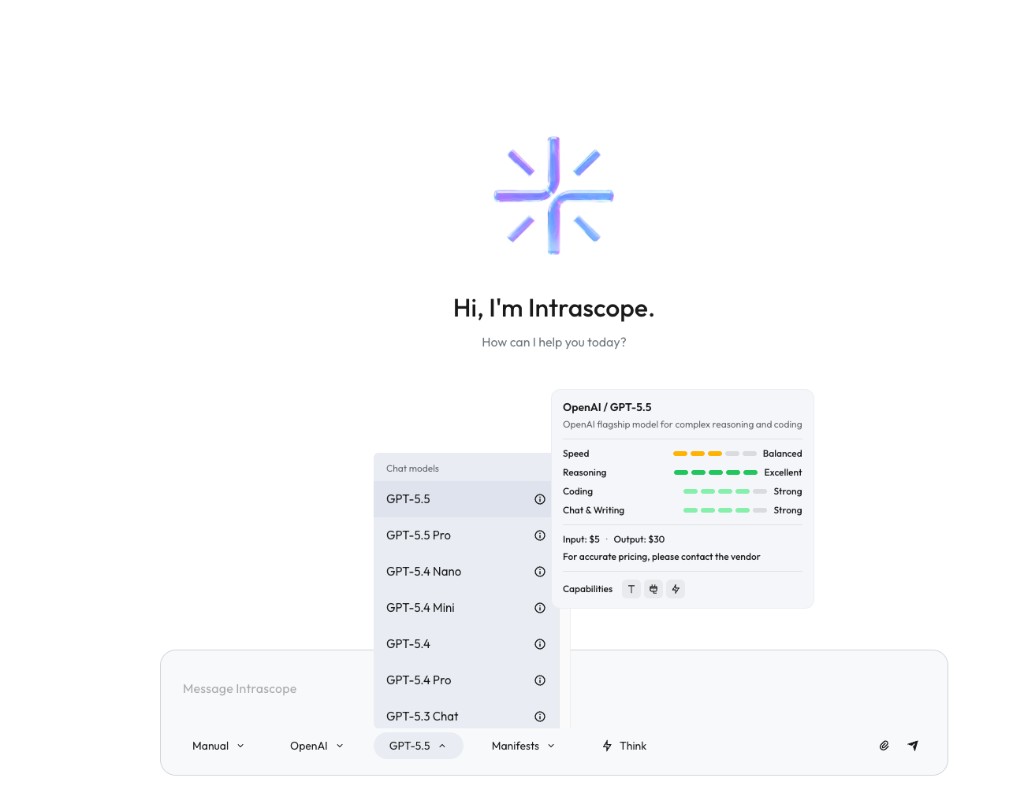
But if you want the best hands-on control, use Manual mode.
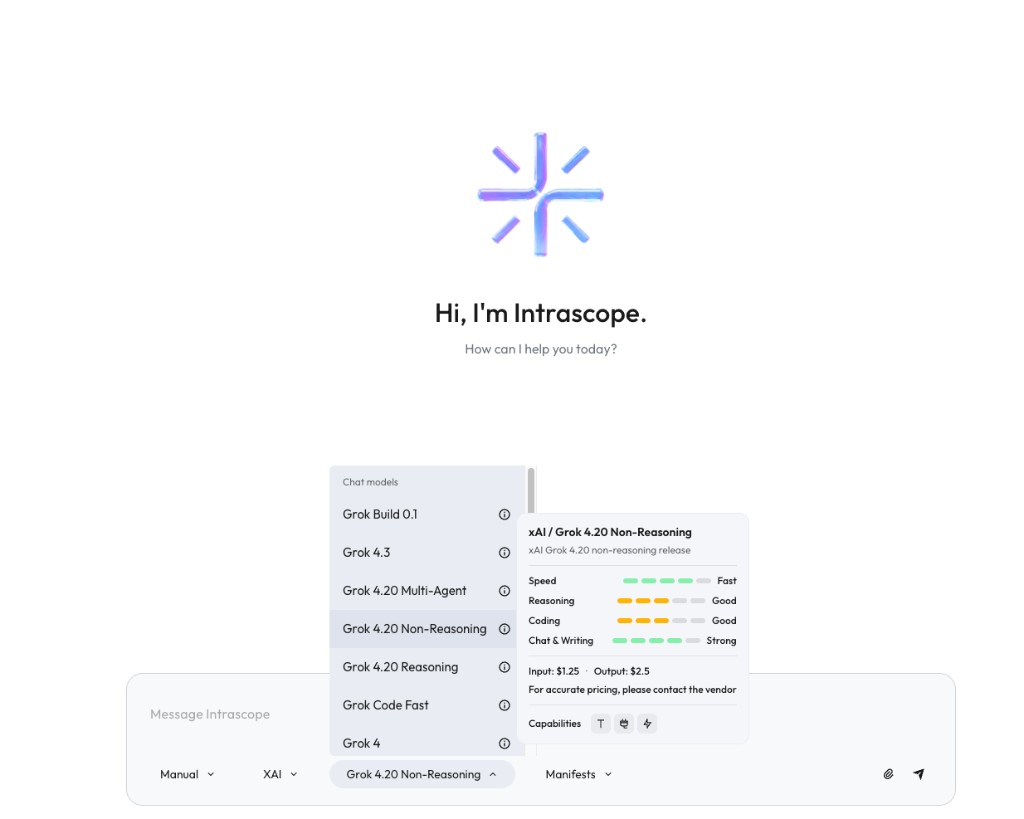
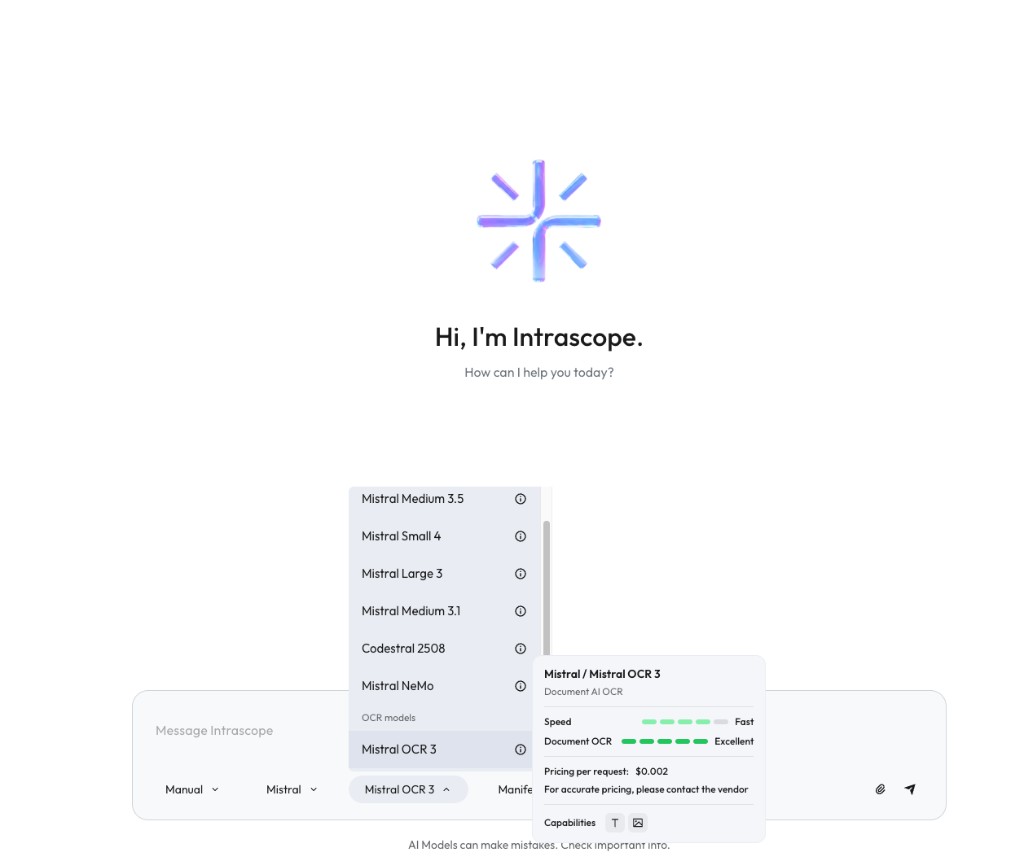
In Manual mode you choose the provider and the model yourself. Every model card shows what it is good at and how pricing is structured, so the team can make smarter decisions before they hit send.
The same transparency applies across providers. On xAI, for example, you can compare a faster non-reasoning Grok option against heavier reasoning variants and see both capability and price before you commit tokens.
Specialized models are exposed the same way. Mistral OCR, for example, is not a general chat default. Manual mode makes that obvious: it is Document AI OCR, priced per request, so teams do not accidentally burn a reasoning model on document extraction.
That is smart optimization in practice:
- use flagship models for complex reasoning and coding
- use faster, cheaper models for mail drafts, rewrites, and brainstorming
- use specialized models for OCR and narrow tasks
- let orchestration help when you want automation, and Manual mode when you want precision
5. Example workflow: how smart orchestration looks in real work
Theory is useful. A real sequence is better. Here is how a marketing team (or consulting team with client deliverables) can run one job across models without burning a flagship engine on every step.
Job: turn a client brief + PDF attachments into a campaign package ready for review.
| Step | What you do | Best model type | Example in Manual mode |
|---|---|---|---|
| 1. Extract the brief | Pull text from PDFs, scanned pages, or image attachments | Specialized OCR / Document AI | Mistral OCR 3 |
| 2. Summarize constraints | Audience, offer, tone, do-not-say list from the Manifest + extracted brief | Fast mid-tier chat model | Grok 4.20 Non-Reasoning or similar fast chat model |
| 3. Brainstorm angles | Generate 10 campaign directions and hooks | Cheap / fast volume model | DeepSeek or a light OpenAI nano/mini model |
| 4. Draft variants | Ad copy, email variants, social posts | Strong writing mid-tier | Claude / Gemini / Mistral medium writing models |
| 5. Final polish | Landing page hero, offer logic, hard client objections | Flagship reasoning model | OpenAI GPT-5.5 (or Pro when stakes are high) |
| 6. Quick rewrites | Shorten, localize, change channel tone | Fast cheap model again | Grok Non-Reasoning / nano / mini |
That sequence is the difference between “we use AI” and “we orchestrate AI.”
- OCR first stops you from pasting screenshots into a reasoning model.
- Fast models handle brainstorming and rewrites where quality margins are wide.
- Flagship models enter only when the decision or final client copy needs depth.
- Manual mode lets you force that path deliberately. Auto orchestration can approximate it when people do not want to pick every model.
If the same team ran every step on GPT-5.5, spend jumps without improving most intermediate drafts. If they always stay on the cheapest model, final copy quality drops. Orchestration is the mix: right model, right step.
A second shorter pattern for consulting work:
- OCR / extract regulation PDF → specialized OCR model
- Explain in plain language → mid-tier chat model
- Client-ready answer with edge cases → flagship reasoning model
- Email rewrite for the client → fast cheap model
Same rule every time: extract and iterate cheaply, reason and finalize carefully.
6. A practical setup checklist before go-live
- Create the workspace and pick a plan that matches team size.
- Choose access mode: managed to start, BYOK for strongest cost control, or both.
- Register provider accounts and create API keys for the models you intend to use.
- Top up vendor balances directly and connect keys in Intrascope LLM providers.
- Enable only the models your team needs and set spending limits.
- Create projects by client, campaign, or department.
- Add Manifests so brand rules and process context stay shared.
- Train the team on Manual mode: read the model card (strengths + price) before defaulting to premium.
- Review usage analytics weekly for the first month, then tighten model defaults.
This checklist lines up with the provider setup flow on our get started page. Do not skip Manifests and model limits. They are what turn chat into infrastructure.
7. Common mistakes that raise costs
- Connecting BYOK, then still letting everyone run only the most expensive flagship models
- Skipping Manifests and pasting the same company brief into every prompt
- Treating Intrascope like a personal ChatGPT clone instead of a shared workspace
- Never reviewing which projects and users drive spend
- Using OCR or specialized models through the wrong general chat default
Avoid those, and Intrascope becomes both cheaper and cleaner than scattered personal accounts. For the bigger buying picture, see best AI workspace for teams in 2026.
Key takeaways
- Intrascope is the communication and context layer. Providers still run the models.
- For the best cost control, register on AI platforms, create API keys, top up vendors directly, and use BYOK inside Intrascope.
- Managed usage is the fastest start and usually still cheaper than separate personal subscriptions.
- Auto orchestration helps. Manual mode gives the strongest control because every model shows strengths and pricing.
- Real work should be staged: OCR and drafts on cheaper models, final reasoning on flagships.
- Projects, Manifests, and usage analytics are what make the setup durable for a company, not just a chat UI.
Conclusion
If you want Intrascope to work at its best, optimize the economics and the model choices early. BYOK with direct provider top-ups gives the cleanest cost path. Managed usage keeps onboarding fast. Manual mode makes every model decision visible, so teams stop paying premium rates for simple work.
Start your free trial, follow get started, or talk with us if you want help mapping BYOK, managed usage, and Manual mode to your team.
Intrascope for teams
Give your team one shared AI workspace instead of scattered accounts
Centralize model access, projects, manifests, and usage visibility. Try Intrascope or book a short walkthrough with our team.
7 days free · No credit card required
Related articles